Showing posts with label mac. Show all posts

Friday, April 22, 2011

Homebrew to the rescue!


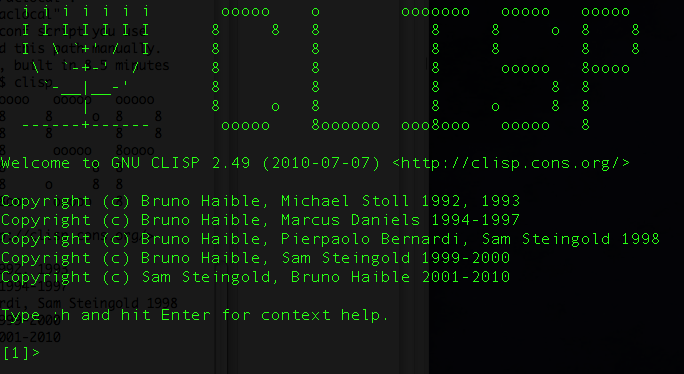
I recently purchased a book on Lisp programming that looks quite good.  Getting CLISP installed on Mac OSX 10.6, however, was not easy--until I found Homebrew.

At first I had used MacPorts, but that was a bit painful.  After a few hours I finally gave up and figured I'd just limit my LISP programming to Ubuntu. 

Lately I have been writing a LOT of Python code.  Because of that, my "temporary" absence from using XCode and iOS dev has become ... well ... prolonged.  I simply can accomplish so much more in Python, and in one-tenth the time.

I dove in to Mac development with a positive attitude, despite using Ubuntu Linux for 99% of my computer work the last several years.  Sure, it's nice to have GarageBand and the hardware on a Mac that works so well with media projects.  But ... I miss Geany.  I miss the package manager in Ubuntu.  Most of all, though, I miss the feeling of using free and open-source software, and the fact that you are NEVER harassed by the software you use.

I left Windows long ago and have never looked back.  When I first came (back) to a Mac recently, I was happy to see how similar OSX was to Linux (or BSD).  Now, however, the differences are starting to accumulate. 


Anyway, at least Homebrew got me CLISP....

Monday, December 6, 2010

New For Skyline Next Semester: Screencasts!


In the past I underestimated how important the multi-media aspects of a computer are to teaching computer science.  Whereas in the past it seemed like the instruction in my lab was happening in human space, all the programming was done on the screen.  Those lines are starting to blur, though, as more and more instruction can be done via the computers themselves. 

In the past Linux was easily my preferred programming environment--still is.  However, I'm a teacher, and I need to do more than just write code.  I never imagined the Mac lab to be so far ahead of anything else I've ever used when it comes to making my teaching more effective. 

This coming Spring students and I will be making screencasts for future students (and for present students that need a review)--ranging from the basics of programming (how to use the unix terminal, text editors, etc), to other particular skills.  I can think of no more efficient way to capture knowledge than to just record examples in realtime. 

Thursday, September 9, 2010

Okay, I'll admit....


Programming on a Mac is quite nice.  This year we got a brand new Mac lab (36 iMacs) for our Computer Science classes at Skyline.  Students love them.  They're built for programming.  Their ability for digital media integration is outstanding.  One of my students is currently working on programming the iSight cams to implement facial recognition. 

Best thing yet:  Haven't had to reboot any of these Macs during class.  :-)

Friday, July 30, 2010

Mac dev vs. Linux dev

I'm so comfortable on Linux, so adjusting to a Mac has been...well, surprisingly easy overall.

Ran into a snag today, however, when I tried to use gcc to compile a simple C program and there were permission problems.  I'm not EXACTLY sure how I solved it, but basically I had to copy a whole directly and put it elsewhere:

usr/include

had to be copied to

usr/local/include

As nice as Macs are, this reminds me of how a default Ubuntu installation does not contain the necessary C header files.  Not a big problem by any means, but it will be good to document it here for when I have to set up a Mac lab for programming classes.

Wednesday, July 28, 2010

MacBook Pro Report #2

What a sleek machine this is.

I don't know if my productivity has increased all that much, as I still seem to be in the holy-crap-you-just-connect-it-and-it-works phase with videos and garageband...

Thursday, July 22, 2010

MacBook Pro Report Day One....

Today I got a brand new MacBook Pro that I will be using to teach Computer Science with.  For the last several years I have been exclusively using Linux, as it is my preferred OS.  However, I pushed for and got a new Mac lab approved for this coming year.  Although Linux was my home choice, the labs at school were all running Windows, and not running it very well. 

So after LMAOing for a while using Photo Booth's special effects, I got to work.  This puppy is gonna hafta be a strong programming machine, and what I learn on here will transfer to the new lab.

Earlier today I was visiting two of my students that have a summer internship with a local high tech firm.  One was writing some Python code on a Mac and commented about the default 8 space tabs.  Well, my first priority in setting up my MBPro, then, would be to get Vim configured correctly.

After struggling a little with those pesky End Of Line errors you get whenever going between Macs, Linux and Windows, I got Vim to do all the syntax highlighting and code completion that I have it do on Linux.  I posted my workaround to our programming forums, and called it a day.

Next step: install and configure Eclipse, Scratch, Alice, and so on....